Online: 2396 online | Members: 0 | Guests: 2396
월요일, 6월 8, 2026
Page Minimap
Reading time: 3 min read
Tagline:Windows압축NTFS드라이브데이터를Decompress하는방법+1

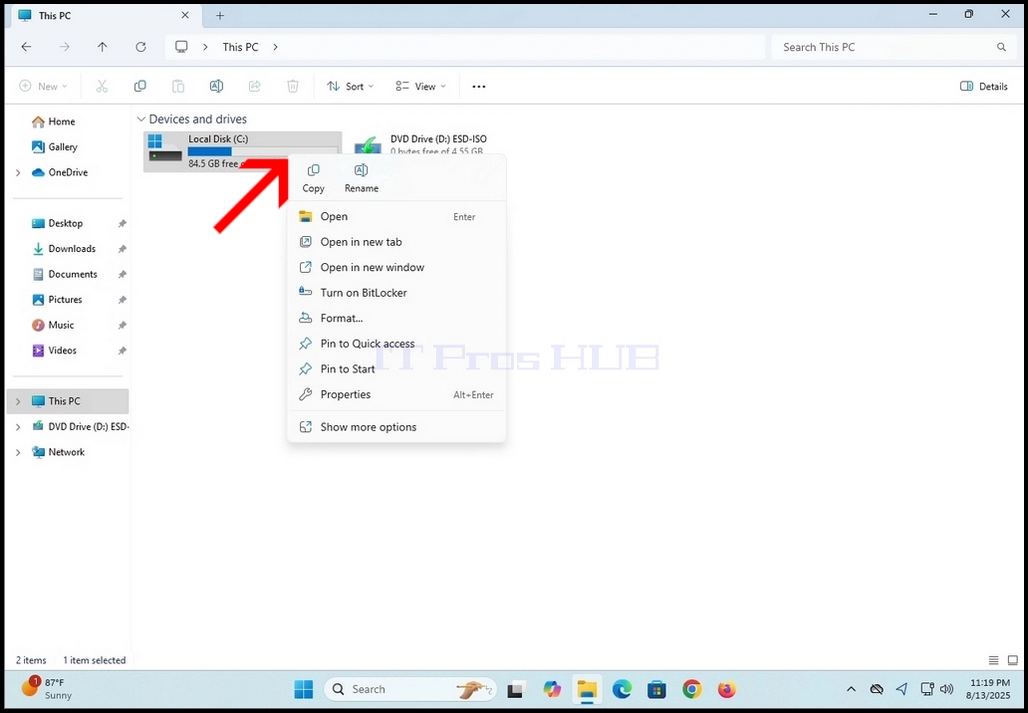
  1. Windows 시작 메뉴를 통해 이 PC로 이동

How_to_Decompress_Data_in_Compressed_NTFS_Drives_and_Partitions_in_Windows_11_1.webp

2. 디스크/파트를 표시하면 한 번에 클릭하여 압축을 해제하고 싶습니다. 이 문서의 경우 우리는 C 드라이브에이 과정을 수행 할 것입니다.How_to_Decompress_Data_in_Compressed_NTFS_Drives_and_Partitions_in_Windows_11_2.webpHow_to_Decompress_Data_in_Compressed_NTFS_Drives_and_Partitions_in_Windows_11_3.webp

3. C 드라이브에 오른쪽 클릭하고 측면 메뉴를 기다립니다.

4. 그 메뉴에서 속성 단어를 찾아 클릭. 속성 창을 기다립니다

How_to_Decompress_Data_in_Compressed_NTFS_Drives_and_Partitions_in_Windows_11_4.webp

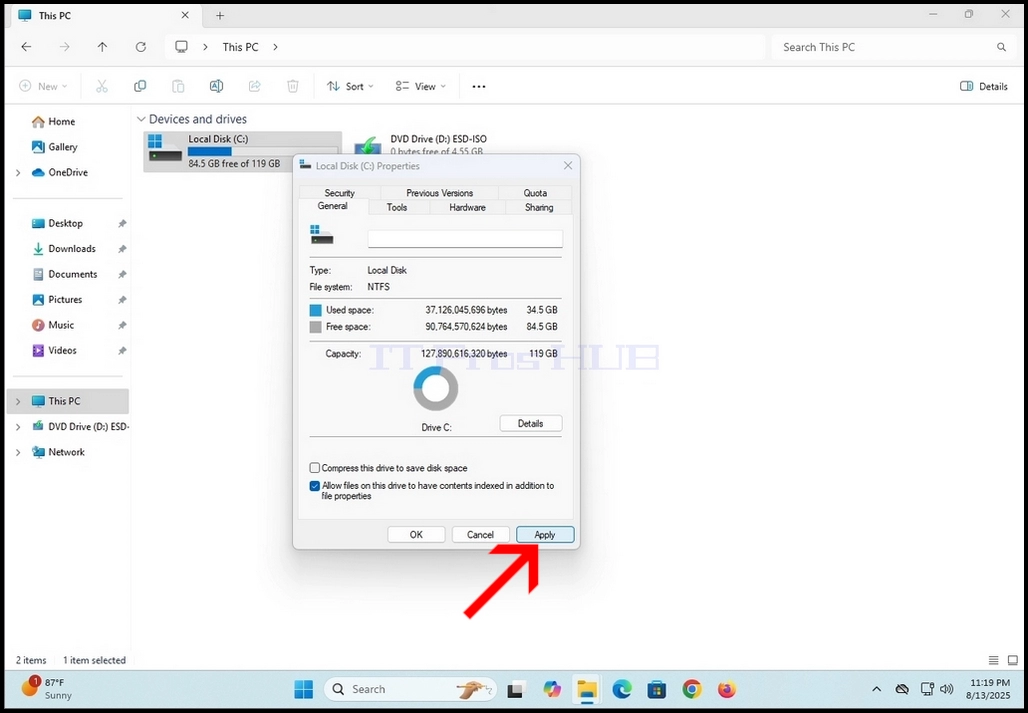
5. 속성 창에서 하단 부분에서 디스크 공간 문장을 저장하는 드라이브를 압축합니다. 파란색 V로 태그해야합니다.

How_to_Decompress_Data_in_Compressed_NTFS_Drives_and_Partitions_in_Windows_11_5.webp

6. 한 번에 클릭하면 파란색 V를 체크 아웃.

7. 일단 당신이 문장 옆에 빈 상자를 볼 수 없습니다. 즉, 그것은 태그되지 않았다.

How_to_Decompress_Data_in_Compressed_NTFS_Drives_and_Partitions_in_Windows_11_6.webp

8. 창의 하단 부분에 적용 버튼을 클릭합니다

How_to_Decompress_Data_in_Compressed_NTFS_Drives_and_Partitions_in_Windows_11_7.webpHow_to_Decompress_Data_in_Compressed_NTFS_Drives_and_Partitions_in_Windows_11_8.webp9. 일단 신청하면, 또 다른, 더 작은 팝업 창이 나타납니다.

10. C:\, subfolders 및 파일은 압축의 전체 효과를 얻기 위해 표시된 변경 사항을 적용해야합니다.

11. OK 버튼을 클릭
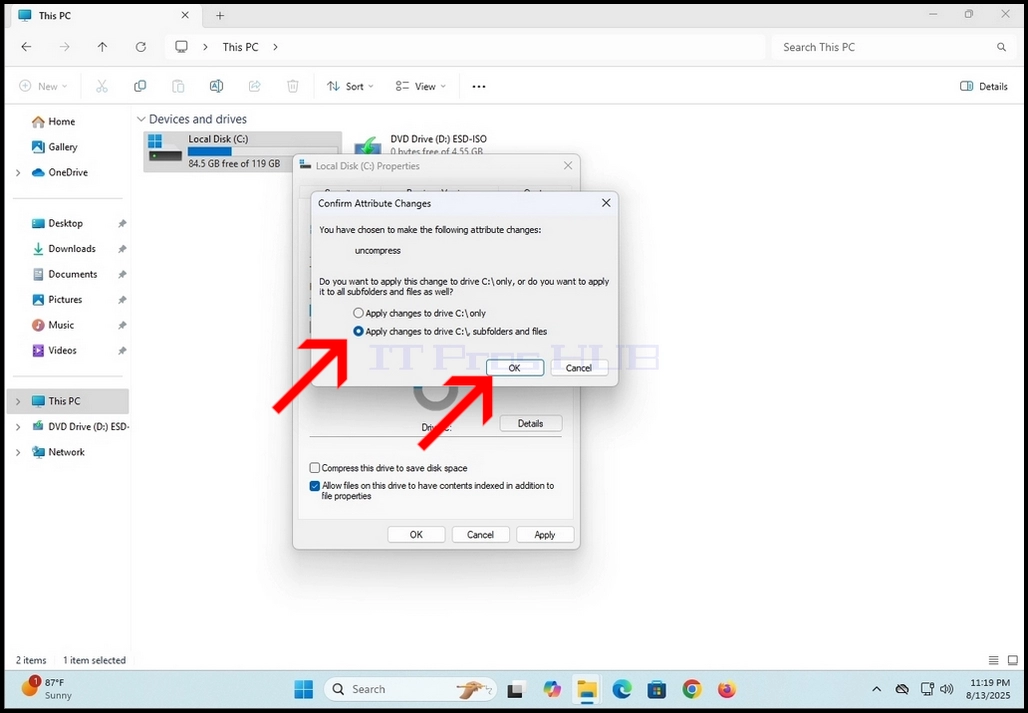
How_to_Decompress_Data_in_Compressed_NTFS_Drives_and_Partitions_in_Windows_11_9.webp

12. 대부분의 경우, Windows Security는 선택한 드라이브/partition, 그 하위 폴더 및 파일에 관리자 액세스를 승인하기 위해 신속한 창을 팝업합니다. 계속 버튼을 클릭하여 이를 허용합니다.

How_to_Decompress_Data_in_Compressed_NTFS_Drives_and_Partitions_in_Windows_11_11.webp

13. 대부분의 경우 드라이브, 하위 폴더 및 파일에 새로운 속성을 적용하는 오류가있을 것입니다. 모든 버튼을 무시합니다.

How_to_Decompress_Data_in_Compressed_NTFS_Drives_and_Partitions_in_Windows_11_12.webpHow_to_Decompress_Data_in_Compressed_NTFS_Drives_and_Partitions_in_Windows_11_13.webp

14. Ignore 모든 버튼이 클릭되면 새로운 속성이 적용되기 시작합니다. 따라서 decompression 프로세스가 시작됩니다. 이 과정은 진도 막대기로 새로운 작은 창에 의해 표시될 것입니다.

How_to_Decompress_Data_in_Compressed_NTFS_Drives_and_Partitions_in_Windows_11_14.webp

15. 프로세스가 진행중인 바 창을 닫을 때.

16. 속성 창을 닫으려면 OK 버튼을 클릭하십시오.

How_to_Decompress_Data_in_Compressed_NTFS_Drives_and_Partitions_in_Windows_11_15.webp